Strips Drip Oil is a LoRaWAN leak sensor that tells water from oil: liquid at its long edges raises a flood alarm, and oil soaked into its absorbing layer raises an oil alarm. It also measures temperature.
In the box
- Strips Drip Oil, with the oil-absorbing foil and the adhesive already on
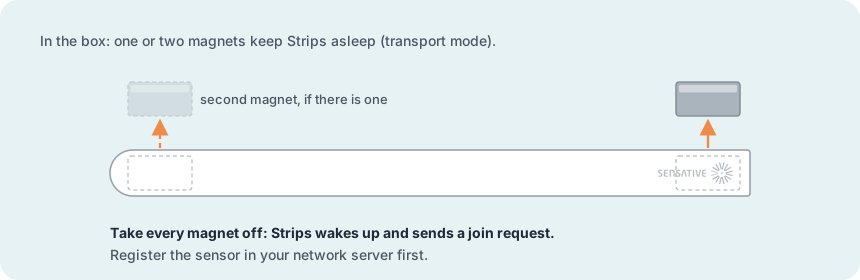
- One or two magnets on the sensor. They keep it in transport mode.
- The LoRaWAN keys (DevEUI, JoinEUI and AppKey), on a label in the box and by e-mail
You need
- A LoRaWAN gateway within range, powered on and online
- An account on a LoRaWAN network server, with the gateway added
- The region on the sensor's label. Gateway and network server must use the same region, and in US915 and AU915 the same sub-band.
- The Strips payload decoder in your network server or application
- The Strips LoRa Config Tool, to turn on detection
From box to ready
Register the sensor in the network server
Add a new end device: OTAA, LoRaWAN 1.0.4, regional parameters RP002-1.0.1 and the frequency plan for your region. Enter the DevEUI, JoinEUI (AppEUI) and AppKey exactly, and add the Strips payload decoder.
Join and check the signal
Take every magnet off the sensor. Hold it by its ends and do not touch the capacitive sensors along the long sides: it calibrates now. It sends a join request: a short green blink, then one long green blink when joined. Five short red blinks means the join failed: check the keys, region, sub-band and gateway. Then hold Strips where it will sit and send an uplink: magnet to the rounded end three times, 20 cm away and 2 seconds apart.
Turn on detection
From the factory, oil and liquid detection are off. In the Strips LoRa Config Tool, choose Strips Multi-sensor +Oil and the profile "Liquid, Oil Leak, and Temperature Alarm". Send the payload as a downlink on port 11, then send an uplink with the magnet so that Strips picks it up.
Mount it within two hours of the join
Lay it flat where a leak will reach its long edges: on the floor, in a drip tray, or under equipment and pipes. Keep it away from very hot or very cold liquids and surfaces, and keep the rounded end (the antenna) off metal. The surface must be clean and dry, with no oil. Peel off the transparent film on the back and press Strips Drip Oil flat onto the surface. On a rough surface, use the +Clip accessory (sold separately).
Calibrate if needed
If the sensor was not mounted, dry and free of oil at that two-hour mark, or if you move it later, calibrate it yourself: with the sensor in place, send the downlink 030030 (hex) on port 11, then send an uplink with the magnet.
More in the full manual
Settings, troubleshooting, maintenance and specifications are in the Strips Drip Oil for LoRaWAN manual.
Support: support@sensative.com