
AI Energy Optimisation – one AI per building
Yggio plans heating and ventilation ahead, within your limits and in the building automation you already have.
Less energy, the same comfort, full control
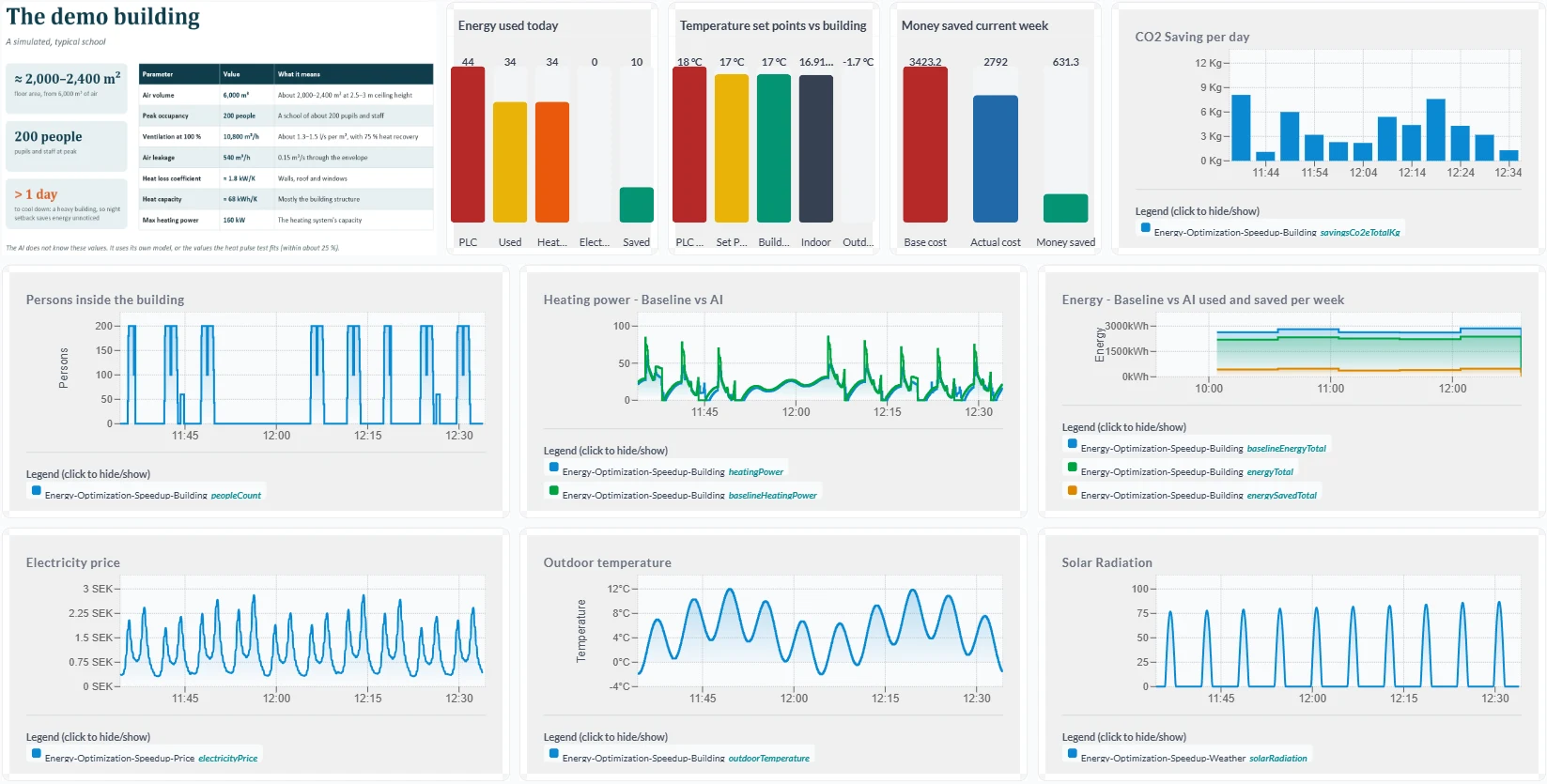
- The AI plans heating and ventilation from the forecast, the energy price and how your building stores heat. In simulation: 17 % less heating energy over a November week, with no comfort deviations.
- There is no new control system: set points are written to the controller you already have, over BACnet, Modbus or OPC UA. Your ordinary control is always there.
- Min/max, overrides and AI on/off are set by you in the rule engine, and the AI optimises within them, never around them.
- Saved energy, cost and CO₂ per day, week and year, in dashboards, reports and Power BI.
The heating curve only sees the outdoor temperature
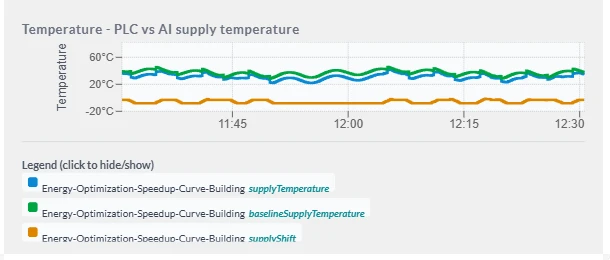
Most buildings are heated from an outdoor-compensated supply curve and a time schedule. The curve is a fixed rule: colder outside, warmer water.
It never measures the rooms and knows nothing about what happens in or around the building. So buildings are heated to be on the safe side: empty rooms, nights warmed too early, energy nobody asked for. What the curve does not see:
- Sun: free heat through the windows
- Occupancy: full or empty, the same curve
- Electricity price: no shift to cheaper hours
- Room temperature: never measured by the curve
- Forecast: it reacts only once it is already cold
One model and one plan per building
1 · Get to know the building. A heat pulse test identifies a grey-box model (2R2C) for each building, describing how that particular building stores and loses heat. In our simulation the model hits the radiator gain within 1 %.
2 · Plan ahead. Model predictive control (MPC) uses the weather forecast, the energy price and the occupancy schedule to calculate the best plan, moving energy in time within your comfort limits.
3 · Two control modes. A room set point where the plant has room control; otherwise an offset of the supply curve. The mode is verified against each plant during the inventory.
The AI explains every decision in plain text (“night setback 17.0 °C, heating start 07:30”), and the supervisor shows whether the value was written, clamped or blocked.
The AI proposes, your limits decide
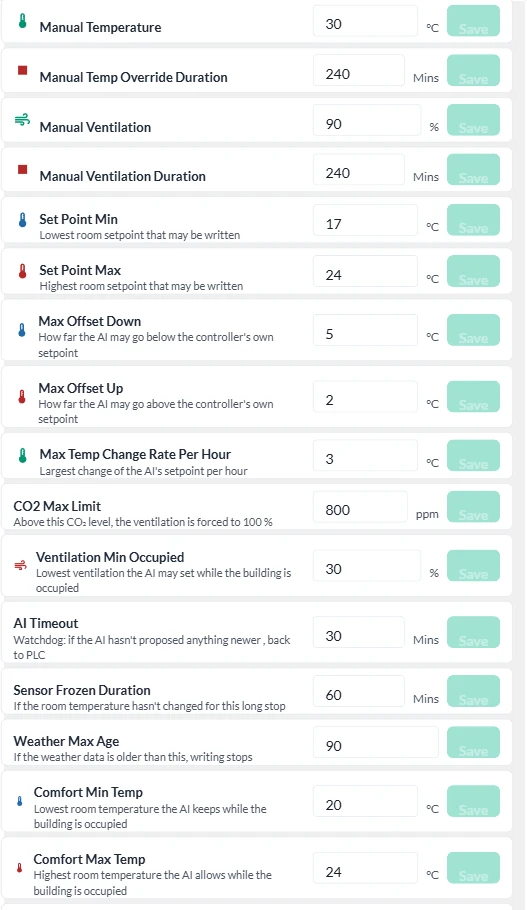
- The supervisor. The only path from the AI model to the controller. Every value is checked against the limits before it is written, and is clamped or blocked with the reason logged.
- Your limits. Min/max set point, maximum offset up and down, rate of change per hour, CO₂ limit and minimum ventilation are set by you in the rule engine, outside the AI module.
- Local clamping. Min/max for written values also in the gateway or Yggio Edge, close to the controller.
- Watchdog and fallback. If the AI’s proposal stops arriving, a sensor freezes or the weather data gets too old, the controller returns to its own program and everyone concerned is alerted.
The operator is always in control
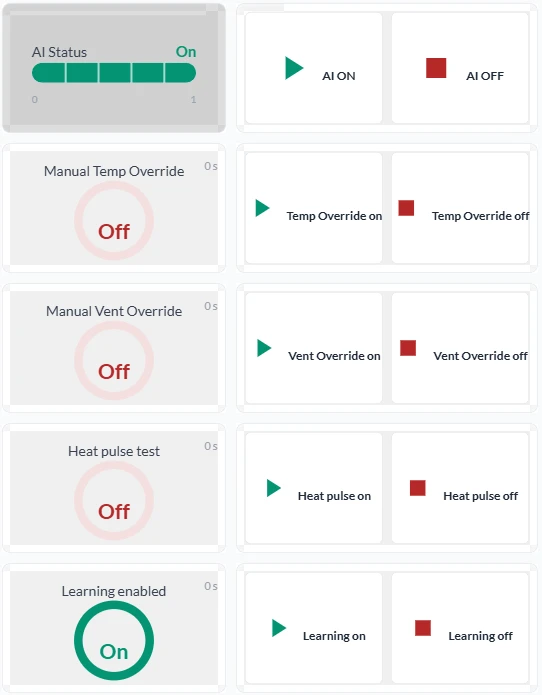
- AI on or off. One click in Yggio, or a rule. With the AI off, the controller runs exactly as it did before.
- Manual override. Temperature or ventilation for a set window, for example 240 minutes. It applies even when the AI is off and releases by itself.
- AI status and AI reason in plain text: what was proposed, why, and what the supervisor did with it.
- Everything is logged: who, what and when, for every set point, override and settings change. The same functions are available as rules and through the API.
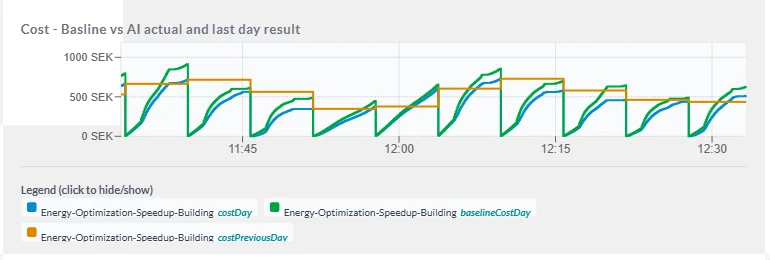
Savings measured, not estimated
Baseline against reality. Your own control (the baseline) is calculated in parallel with the same model and the same weather, so the saving is the difference, not an estimate.
Per day, week and year. Energy, cost at the current energy price, and CO₂ in Yggio dashboards, reports and Power BI.
Comfort is reported too. Room temperature against the comfort limits, CO₂ and ventilation, so the saving never comes at the expense of the indoor climate.
The saving depends on the building, its operating hours and its current control, and is verified for each property during the inventory and shadow operation.
Open and vendor-neutral
- Your existing automation. BACnet, Modbus, OPC UA and M-Bus: Yggio works with the leading makes of building automation.
- The sensors you choose. 500 device translators covering many manufacturers, for LoRaWAN, M-Bus, Modbus and more.
- One data model. FIWARE NGSI-LD: all data in the same format, whatever the source. Sensative is a FIWARE Gold Member.
- Open API. A documented REST/NGSI API and ready connections to Power BI, Grafana and Node-RED.
- AI connectors and MCP. Connectors for OpenAI and Claude, and an MCP server: today for the AI Assistant, next for your own assistants and agents on your data.
- Our AI or a partner’s. External optimisation services can run on the same platform. Our AI is an option, not a requirement.
Governance first, then integration
- Rights in three dimensions. Per unit in the organisation tree, per person and per role, with single sign-on to for example Entra ID.
- You own your data. You decide who sees what, and access can be withdrawn at once.
- Yggio runs as a service (by default with our partner Cleura for the EU market), on premises in your environment, or at the edge. All connections are outbound, and no inbound port is opened.
- An independent penetration test in January 2026 found no critical, high or medium issues. How Yggio meets GDPR, NIS2, the Cyber Resilience Act, the Data Act and the AI Act is set out rule by rule under Trust & sovereignty.
Getting started
1 · Inventory. Operating cards, controller makes, sensors and operating modes per building. Together we choose the control mode.
2 · Connect. Controllers and meters through a gateway or Yggio Edge. Rights and the organisation tree are set up.
3 · Learn. A heat pulse test gives a model per building. In shadow operation the AI plans but does not write, so the result can be compared.
4 · Set the limits. Operating modes, min/max and tolerance bands in the rule engine, together with your operations team, who are trained in the control view.
5 · Optimise and follow up. Active control, follow-up in dashboards, reports and Power BI, and regular operations meetings.