Strips Guard 800 is a magnetic open/close sensor for Z-Wave. It reports in real time when a door, window, gate, cabinet or drawer opens or closes.
In the box
- Strips Guard 800, with the adhesive already on the back
- A magnet. It keeps the sensor asleep in the box. Later it goes on the door or window.
You need
- A Z-Wave controller (gateway or hub) and its app, within range. Use S2 security if the controller supports it.
- The QR code on the back of the sensor, for SmartStart
- Ordinary tape, to try the position
From box to ready
Join the Z-Wave network
In the controller app, choose SmartStart (or "add with QR code"), scan the QR code on the back of Strips and take the magnet off. The sensor is added within 10 minutes. Without SmartStart: put the controller into add mode, then take the magnet off.
Check the signal where it will sit
Hold Strips where it will sit and do a wake-up: magnet to the rounded end, wait for the blink, move it away. Three times in total.
Choose the place
Strips goes on the frame (recommended) and the magnet on the door or window, or the other way round. Keep both clear of hinges and locks. To hide Strips inside the frame you need a gap of at least 3.5 mm.
Mount
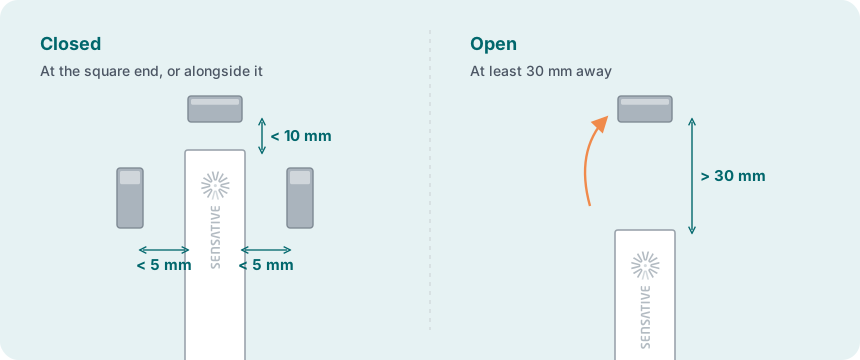
Clean both surfaces: clean, dry and at least +10 °C. Tape Strips in place, put the magnet opposite the square end, and check that the controller shows open and closed. Then mark the position, peel the film off the adhesive and press Strips firmly in place. Fix the magnet the same way.
Test
Open and close the door or window a few times.
More in the full manual
Settings, troubleshooting, maintenance and specifications are in the Strips Guard 800 for Z-Wave manual.
Support: support@sensative.com