Prism tells whether a train seat is occupied, without a camera: a 60 GHz radar under the luggage rack looks down at the seat and reports occupied or free over LoRaWAN. It is supplied as part of SeatSense.
In the box
- Prism in the chosen mounting variant, with the adhesive already on the back. A double Prism is two radar units, each a LoRaWAN device of its own
- The keys (DevEUI and AppKey) for each radar unit come with the delivery information
- The installation jig is used by the SeatSense installers and is not part of the delivery
You need
- LoRaWAN coverage where the train runs, on board or along the track, and an account on a LoRaWAN network server with the gateways added
- The DevEUI and AppKey of each radar unit. The JoinEUI is
70B3D52C0001D4C3 - An Android phone with NFC is recommended: it starts the radar units and runs Hugin (NFC, LoRaWAN board; needs an Yggio user account, with the units registered to your organisation) and SweIoT Toolbox (Bluetooth, radar board). An iPhone can only start the units, with an NFC reading app
- A payload decoder for Sensative VSM sensors. In SeatSense, Yggio decodes the messages and builds the seat map
- The installation jig and the seat layout, which tell which mounting variant goes where
From box to ready
Register each radar unit in the network server
Add a new end device for each radar unit (a double Prism is two devices): OTAA, MAC version 1.0.4, regional parameters RP002-1.0.3, max EIRP 14 dBm, and your frequency plan. Enter the DevEUI, the AppKey and the JoinEUI.
Join the network with NFC
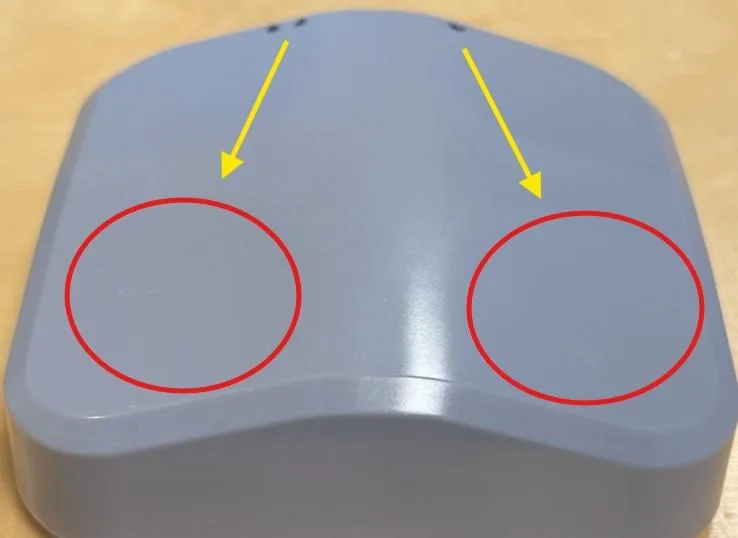
Switch NFC on and take off the phone case. Each unit has its own NFC area on the front face, opposite the dots on the edge: one dot is unit 1, two dots unit 2. Lay the phone flat on each in turn and keep it still for about 5 seconds.
Check the signal where it will sit
Hold Prism where it will be mounted and look at its messages in the network server.
Fit it under the luggage rack
Clean the surface with isopropyl alcohol and water and let it dry. Place Prism in the installation jig, which sets the position and direction over the seat, peel the film off the adhesive and press firmly. Nothing should stand between the radar and the seat.
Tune and test
The radar is tuned to each seat layout; in SeatSense this is done from Yggio, over LoRaWAN. Then test each seat: sit down, and get up again. Prism reports only when the state of a seat changes.
More in the full manual
Settings, troubleshooting, maintenance and specifications are in the Prism for LoRaWAN manual.
Support: support@sensative.com