Strips Comfort 800 measures temperature, relative humidity and ambient light (lux) where it is mounted, and reports them over Z-Wave.
In the box
- Strips Comfort 800, with the adhesive already on the back
- A magnet on the sensor, which keeps it asleep until you start. Keep it for magnet commands.
You need
- A Z-Wave controller (gateway or hub) and its app, within range. Use S2 security if the controller supports it.
- The QR code on the back of the sensor, for SmartStart
From box to ready
Join the Z-Wave network
In the controller app, choose SmartStart (or "add with QR code"), scan the QR code on the back of Strips and take the magnet off. The sensor is added within 10 minutes. Without SmartStart: put the controller into add mode, then take the magnet off.
Check the signal where it will sit
Hold Strips where it will sit and do a wake-up: magnet to the rounded end, wait for the blink, move it away. Three times in total.
Choose the place
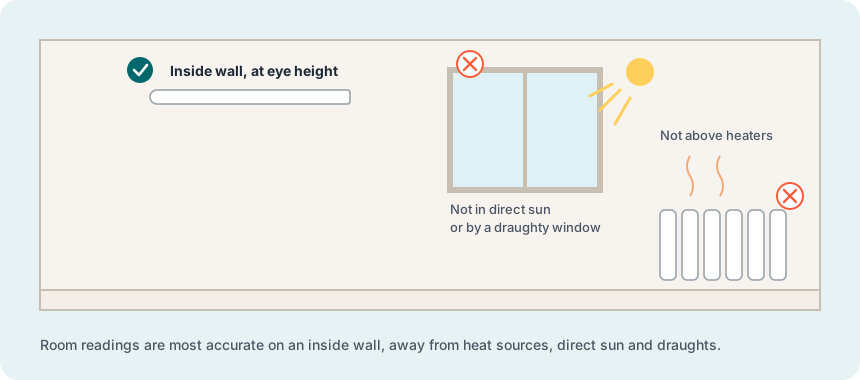
For room climate: an inside wall, away from direct sun, radiators, other heat sources and draughts. For light: where the light falls as in the rest of the room, not behind curtains or inside cupboards. Indoors or a sheltered spot (IP63).
Mount
Clean the surface: clean, dry and at least +10 °C. Peel the film off the adhesive and press Strips firmly in place. The adhesive is permanent, so check the position first. For rough or temporary surfaces, use the +Clip accessory (sold separately).
Check the readings
Most installations work with the default settings: temperature and humidity are sent when they change, and light is reported with a filter. Alarms, light triggers and reporting intervals are changed in the controller app.
More in the full manual
Settings, troubleshooting, maintenance and specifications are in the Strips Comfort 800 for Z-Wave manual.
Support: support@sensative.com