Square Sound measures the sound level in a room, together with temperature and relative humidity, and reports them over LoRaWAN. It measures levels only and does not record audio.
In the box
- Square Sound, with the adhesive already on the back
The Square screw mounting kit is sold separately.
You need
- A LoRaWAN gateway, online and in range, added to your account on a LoRaWAN network server
- The sensor’s DevEUI and AppKey, from the delivery information. The JoinEUI for all Square sensors is
70B3D52C0001D4C3 - A phone with NFC. Android is recommended; an iPhone needs an NFC reading app
- A payload decoder for Sensative VSM sensors (built into Yggio)
- Optional: the Hugin NFC app (Android phone with NFC and GPS), an Yggio user account, and the sensor registered in Yggio with your organisation as its owner
From box to ready
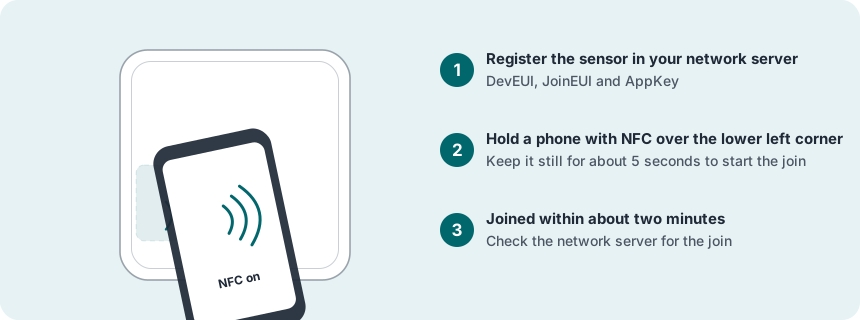
Register the sensor in the network server
Add a new end device: activation OTAA, MAC version 1.0.4, regional parameters RP002-1.0.3, and the frequency plan for your region. Enter the DevEUI, AppKey and JoinEUI exactly, and set up decoding of the messages.
Join the network with NFC
NFC on, phone case off. Lay the phone flat over the lower left corner of the front of Square Sound and keep it still for about 5 seconds: that starts the join.
Choose the place and check the signal
In the room, or the area people use, whose sound you want to measure, away from unrelated sound sources such as a fan, a ventilation outlet, a loudspeaker or a door that bangs. Also an inside wall at eye height, away from sun, radiators and draughts. Indoors or sheltered outdoors (IP63). Check the signal there.
Mount
Adhesive: the surface must be clean and dry. Peel the film off and press the sensor firmly in place. Or screw the two adhesive plates of the Square screw mounting kit to the wall and press the sensor onto them.
Test
Breathe on the sensor, or hold it in your hand for a minute, and talk or play some sound near it.
More in the full manual
Settings, troubleshooting, maintenance and specifications are in the Square Sound for LoRaWAN manual.
Support: support@sensative.com