Puck Radar measures the distance to whatever is in front of it with a 60 GHz radar, from 0.2 to 6.8 m, and reports it over LoRaWAN as a distance, a level or an occupied/vacant state: parking bays, water levels, fill levels, snow depth.
In the box
- Puck Radar, with the battery fitted and a standard (about ±60°) or narrow (about ±10°) lens
- An adhesive for flat surfaces. Mounting plates are sold separately
- The keys (DevEUI and AppKey) come with the delivery information
You need
- A LoRaWAN gateway within range, online, and an account on a LoRaWAN network server with the gateway added
- The sensor’s DevEUI and AppKey. The JoinEUI is
70B3D52C0001D4C3 - An Android phone with NFC is recommended: it starts the sensor and runs Hugin (NFC, LoRaWAN board; needs an Yggio user account, with the sensor registered to your organisation) and SweIoT Toolbox (Bluetooth, radar board). An iPhone can only start the sensor, with an NFC reading app
- A payload decoder for Sensative VSM sensors in your network server or application
From box to ready
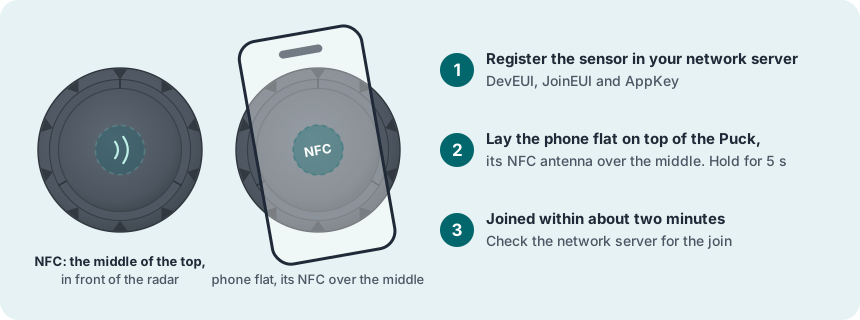
Register the sensor in the network server
Add a new end device: OTAA, MAC version 1.0.4, regional parameters RP002-1.0.3, max EIRP 14 dBm, and your frequency plan. Enter the DevEUI, the AppKey and the JoinEUI.
Join the network with NFC
Switch NFC on and take off the phone case. Lay the phone flat on the middle of the top of Puck, right in front of the radar, and keep it still for about 5 seconds.
Check the signal where it will sit
Put Puck where it will be mounted and look at its messages in the network server.
Choose the radar method and range
The radar measures only while Puck is joined. Check that the method (Well, Bin, Parking, Seating or Distance2) and its range fit the job, with radar commands from the VSM Configuration Tool or on site in SweIoT Toolbox.
Mount it
Use the adhesive on a smooth, dry, flat surface cleaned with isopropyl alcohol and water, or a mounting plate, a 45 mm drilled hole or a bracket across a well. Point the radar straight at the target, with nothing in front of the lens. Over water, point straight down or tilt only a few degrees, clear of the side walls. Keep the top reachable for NFC.
Test
Put something at a known distance in front of the radar, or wait for the real target. The radar command test:10 measures every 10 seconds for 10 minutes.
More in the full manual
Settings, troubleshooting, maintenance and specifications are in the Puck Radar for LoRaWAN manual.
Support: support@sensative.com